

The Seated Working Day
Many knowledge workers spend between six and nine hours per day seated at a desk. The cumulative effect of that posture — particularly when the chair and desk height are poorly matched, or when the chair itself does not support the spine correctly — can manifest as back pain, shoulder tension, and the kind of fatigue that is distinct from the tiredness of genuine effort.
Ergonomics is the practical science of making a workspace function in a way that does not gradually damage the person using it. For anyone who works at a desk regularly, its principles are worth understanding properly.
What an Ergonomic Chair Actually Does
The goal of a well-designed office chair is to maintain the spine’s natural curvature — particularly the inward curve of the lumbar region — during extended periods of sitting. When this lumbar support is absent, the lower back rounds outward, the pelvis tilts backward, and the intervertebral discs in the lower spine receive uneven pressure. Over months and years, this produces the lower back problems that have become a defining occupational health issue of office work.
Adjustability is the key mechanism. A fixed lumbar support that sits at the right height for one person will be mispositioned for many others. The best chairs offer lumbar adjustment (height and depth), seat height adjustment, and armrest adjustment at minimum.
See also: Amsterdam’s Hidden Gems
The Material Question
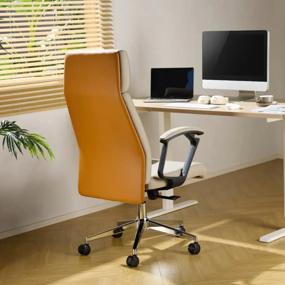
Office chair upholstery divides broadly into mesh, fabric, and leather or leather-effect finishes. Each has genuine advantages. A leather office chair offers a formal aesthetic that works particularly well in home offices that also serve as meeting spaces or video call backgrounds — the visual weight and finish reads as professional in a way that some mesh alternatives do not. It also wipes clean easily, which matters in home environments where the boundary between the desk and the rest of the room is less controlled than in a commercial office.
The limitation of genuine leather in an office chair is warmth — it retains heat more than mesh, which can be uncomfortable in a warm home during summer months. Faux leather addresses the cost issue but tends to degrade more quickly with daily use, particularly at pressure points and seams. Mesh is the most breathable option and has become the standard in performance-focused ergonomic chairs, though it carries a less formal visual character.
Desk and Chair as a System
A chair’s effectiveness depends partly on how it relates to the desk. The standard rule is that forearms should rest roughly parallel to the floor when keyboard height is correct, with the elbows bent at approximately 90 degrees. If this requires the chair seat to be very high, the desk may be too low; if it requires a very low seat, the desk may be too tall.
Many home offices work around a fixed-height desk, which means the chair has to compensate. If the chair is set high enough for correct elbow position but the feet no longer reach the floor, a footrest resolves the resulting hip-angle problem. This combination is preferable to lowering the chair and accepting incorrect arm positioning.
Monitor Height and Neck Position
Back and lumbar health get most of the attention in ergonomic discussions, but neck position is equally consequential. The correct monitor position has the top of the screen at or slightly below eye level, so the natural resting position of the neck places the gaze toward the centre of the screen rather than downward or upward.
Laptop users face a consistent challenge here: the screen is attached to the keyboard, so raising the screen to the correct height also raises the keyboard to an incorrect height. The standard solution is a separate keyboard combined with a laptop stand or external monitor, which decouples the two positions — a worthwhile investment for anyone using a laptop as their primary work device for more than two hours daily.
Movement and Rest Breaks
Even the best chair cannot make extended static sitting without breaks ergonomically benign. Short breaks every 45 to 60 minutes — standing up, walking briefly, stretching the hip flexors — reduce the cumulative load on the spine and also appear to improve cognitive performance during the subsequent working period.
Height-adjustable desks, which allow alternating between seated and standing positions throughout the day, are increasingly popular for this reason. As a tool for introducing variety into an otherwise static working day, they serve a genuine purpose.
